
AirDroid Parental Control
SAND STUDIOParenting
4.31.83K Reviews
- Version
- 2.9.0.1
- Installs
- 10.00M
- Age Rating
- Everyone
Screenshots

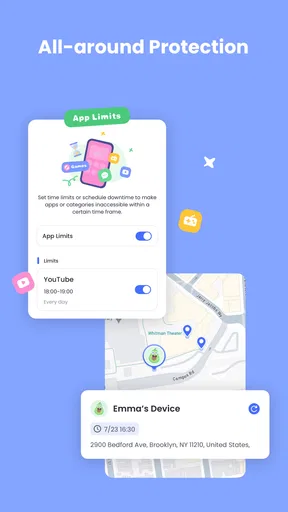
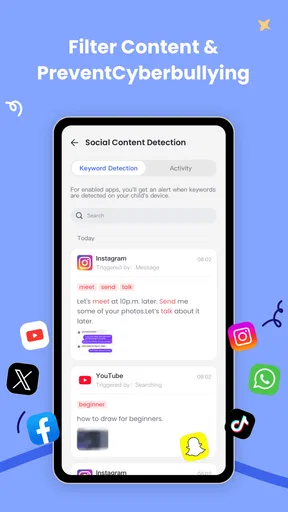

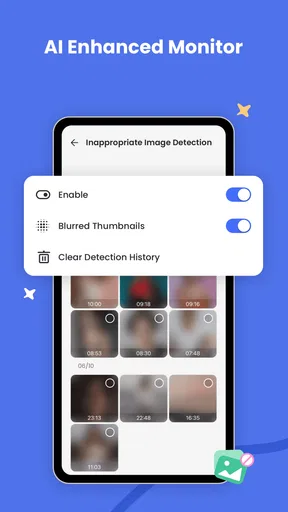
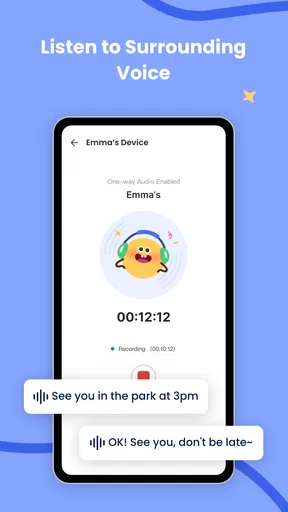
Our Review of AirDroid Parental Control
 Analysis by Appyee
I’ve found that parental-control apps are most useful when they help a family coordinate, not when they turn a parent into a full-time phone monitor. AirDroid Parental Control brings location tools and device rules together, so it may suit families who want one place to check in and set boundaries. Its usefulness still depends on both devices being connected and configured properly, which is worth considering before you rely on it during a busy day.
When the connection is doing the work
Location updates and remote controls depend on a working connection between the child’s phone, the parent’s phone and the services involved. In everyday use, that means a map or alert is only as timely as the phone’s network access and location signal allow. I’d treat the location view as a helpful check-in, not a guarantee that every position will appear instantly or precisely.
That distinction matters most when plans change. If a child is walking home, a parent can check the app rather than repeatedly calling, but a delayed update should prompt a normal check-in rather than an assumption that something is wrong. The same applies to safe-zone alerts: they can help flag a boundary crossing, but they work best as one part of a family’s safety routine, alongside clear expectations about where a child is going and how to reach them.
Using it across a child’s day
The strongest fit is a household where a parent wants to balance location awareness with practical limits on phone use. A school-day routine is a good example: set device boundaries around homework or bedtime, then use location tools for agreed check-ins after school. That is more constructive than watching every movement or treating every alert as a reason to intervene.
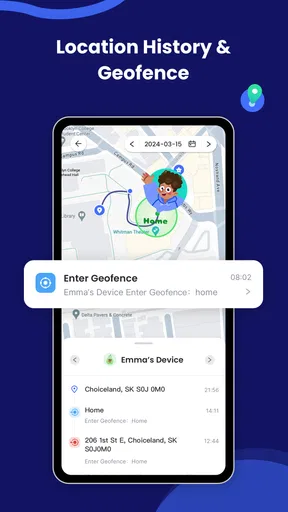
For a child who regularly travels between school, activities and friends’ homes, geofencing can provide a useful nudge when they leave a familiar area. I would set zones around places that genuinely matter, rather than drawing lots of tiny boundaries. Too many notifications can become background noise, and parents may start ignoring the very alert they wanted to notice.
It may be less suitable for older teens who expect substantial privacy, or for families who want a light-touch arrangement rather than remote oversight. In those cases, a shared location feature or a direct agreement about check-ins may feel more respectful. I’d explain what is being monitored and why before enabling controls; trust is harder to rebuild if a child discovers monitoring without a conversation.
What happens when something goes wrong?
Weak reception is a real limitation for any location-based tool. A phone inside a large building, underground or in an area with a poor signal may not report its position as cleanly as it does outdoors. If an update looks stale or slightly misplaced, I would first check whether the child’s phone can connect and whether its location signal has improved, then use a call or message if the situation needs an immediate answer.
Remote rules also make more sense when they are tested before they are needed. A parent can try a modest screen-time limit at a calm moment, confirm that the child understands what it does, and adjust the routine if it blocks something important. This avoids discovering during homework or an evening call that a setting was too strict for the family’s actual schedule.
Battery and permissions can affect reliability too, as they can with other monitoring apps. I would check the setup on both devices after major changes to phone settings or after an app update, rather than assuming every rule and location alert continues to work exactly as before. That small maintenance habit is more useful than relying on the app once and forgetting about it.
Keeping mobile use sensible
Because features such as location and remote monitoring involve ongoing communication, families should think about when they need them and how much phone use they are comfortable with. If a child has limited mobile data, it is sensible to avoid unnecessary checking and keep routine conversations to ordinary family check-ins where possible. The app’s value is not measured by how often a parent opens it.
A practical approach is to reserve alerts for meaningful situations: a boundary that matters, a screen-time rule the family agreed on, or a check-in when plans change. This reduces alert fatigue and gives the child room to manage ordinary parts of the day. I’d also revisit the rules as a child becomes more independent; a setting that helped a younger child may feel intrusive later.
How it fits among alternatives
Compared with relying only on a phone’s built-in family settings, a dedicated parenting app can bring more of the monitoring and control experience into one place. The trade-off is that it asks families to install and maintain an additional app and to be comfortable with the level of oversight it enables. A basic location-sharing arrangement may be simpler if all a parent needs is a way to see where family members are, while built-in screen-time controls may be enough for households focused mainly on device routines.
I would choose this app when location awareness, app limits and broader parental controls are all part of the same family plan. I would skip it if the goal is only occasional location sharing, or if a child’s device use is better handled through conversation and a few simple rules. More controls are not automatically better; the right option is the one a family can explain, maintain and use without turning every phone activity into a dispute.
Setting Up: A Breeze or a Challenge?
First off, let’s talk about the setup. Getting started with AirDroid Parental Control is a pretty straightforward process. You just download the app on both your device and your kiddo’s device, and you’re good to go. The app’s interface is intuitive, which means you don’t need to be a tech guru to figure things out. I appreciated the step-by-step guide they provide during installation—super helpful for us non-techy types!
Features That Stand Out
Now, onto the good stuff. What does this app actually do? Well, it’s packed with features that make it easier to keep tabs on your kids’ online activities. From real-time location tracking to screen time management, the app covers all bases. And let me tell you, the location tracking is a game-changer. I can see where my kids are without having to call them every five seconds. It’s like having an extra set of eyes!
The screen time management tool is another highlight. You can set limits on how much time your kids spend on their devices, which is great for encouraging them to take breaks and, you know, maybe go outside once in a while. Plus, the app sends you alerts if they’re using certain apps too much, which is a nice touch.
Communication and Safety
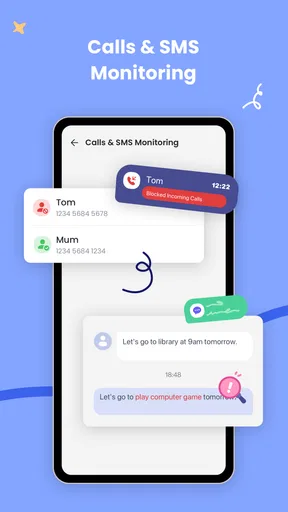
One of my favorite features has to be the secure messaging. I can easily communicate with my kids through the app without worrying about privacy issues. It’s like having our little family chat that’s totally secure. Plus, the app allows for remote monitoring, so you can keep an eye on their phone activities, including text messages and calls.
For safety, the app offers a geofencing feature. You can set up safe zones, and you’ll get notified if your kid steps outside those areas. It’s perfect for peace of mind when they’re at school or at a friend’s house.
Customization and Control
One thing I love about AirDroid Parental Control is the level of customization it offers. You can tailor the settings to fit your family’s needs. Whether it’s blocking certain apps during homework time or setting specific bedtimes, the app gives you the flexibility to adjust as needed. It’s like having a digital babysitter that listens to your every command!
Performance and Reliability
In terms of performance, the app runs smoothly with minimal glitches. I’ve noticed that it doesn’t drain the battery too much, which is always a plus. And the real-time updates are pretty reliable—I haven’t experienced any major delays or issues so far.
However, I did notice that sometimes the GPS can be a bit off, especially in areas with poor reception. But honestly, that’s a minor hiccup compared to the overall functionality of the app.
Final Thoughts
So, what’s the verdict? I’d say AirDroid Parental Control is a solid choice for any parent wanting to keep their kids safe in the digital age. It’s packed with features that make parenting a tad bit easier, and the peace of mind it offers is priceless. While it has a couple of minor quirks, they’re nothing that would stop me from recommending it.
SAND STUDIO’s parenting app is free to install, with in-app purchases ranging from $9.99 to $89.99 per item. It has a 4.5 average from around 130,000 ratings, and has passed 10 million installs. It is rated for Everyone, first released on July 29, 2022, and version 2.7.0.4 lists Android 8.0 as its minimum operating system. Those details make it easy to see that it has a broad audience, but the practical question is whether its combination of tools fits your household better than simpler controls already on your devices.
If you’re ready to take control and ensure your kids’ safety online, give this app a try. You can find the download links on our site, so go ahead and check it out. Happy parenting!
Privacy and Permissions
See what permissions an app requests and how it handles your data.
- Location
- approximate location (network-based), precise location (GPS and network-based)
- Photos/Media/Files
- read the contents of your USB storage, modify or delete the contents of your USB storage
- Storage
- read the contents of your USB storage, modify or delete the contents of your USB storage
- Camera
- take pictures and videos
- Microphone
- record audio
- Wi-Fi connection information
- view Wi-Fi connections
- Other
- view network connections, pair with Bluetooth devices, change network connectivity, allow Wi-Fi Multicast reception, connect and disconnect from Wi-Fi, full network access, change your audio settings, run at startup, draw over other apps, control vibration, prevent device from sleeping
Verdict
Strengths of AirDroid Parental Control
- Easy setup and user-friendly interface.
- Real-time location tracking is accurate.
- Customizable screen time limits.
- Remote monitoring of device activity.
- Cross-platform compatibility.
Limitations of AirDroid Parental Control
- Limited features in free version.
- Requires stable internet connection.
- Some features may drain battery.
- Notifications can be delayed at times.
- Occasional app crashes reported.
Other Releases by SAND STUDIO
View All
AirDroid Parental Connector
Parenting3.4
Similar Picks in This Category
View All
Family Space
Motorola Mobility LLC.3.9

شرطة الأطفال - مكالمة وهمية
Oub Apps4.1

Findmykids: Parental Control
LETEM LTD4.6

Pregnancy + | Tracker App
Philips Electronics UK Limited4.8

Policía de niños - para padres
Kids police4.7

Pregnancy App
Amila4.9
Frequently Asked Questions
What is AirDroid Parental Control and how does it work?
AirDroid Parental Control is an app designed to help parents monitor and manage their children's device usage. It allows parents to view real-time location, screen time, app activity, and even set usage limits. By installing the app on both the parent's and child's devices, parents can ensure their kids are using technology safely and responsibly.
Is AirDroid Parental Control secure and private?
Yes, AirDroid Parental Control prioritizes security and privacy. The app uses encryption to protect your data and ensures that only authorized users can access the information. It complies with privacy regulations, and parents can rest assured that their family's data is handled with care and confidentiality.
Can AirDroid Parental Control be used on multiple devices?
Absolutely, AirDroid Parental Control supports monitoring multiple devices. Parents can manage and monitor more than one child's device simultaneously, making it convenient for families with several children. Each device needs to have the app installed, and once set up, parents can easily switch between them within the app interface.
Does AirDroid Parental Control offer screen time management features?
Yes, the app provides comprehensive screen time management features. Parents can set daily usage limits, schedule device-free periods, and receive detailed reports on screen time activity. This helps in promoting healthy digital habits and ensuring that children balance their time between digital and offline activities.
What kind of customer support does AirDroid Parental Control offer?
AirDroid Parental Control provides robust customer support, with options for live chat, email support, and an extensive online help center. Users can find FAQs, guides, and troubleshooting tips on their website. This comprehensive support ensures that any issues or questions are addressed promptly and effectively.
